

- Core Concepts
- SSO (Single Sign On)
Core Concepts
SSO (Single Sign On)
Let your users log in or sign up using a Backboard account
SSO (Single Sign On) lets users log in to your app using an account they already have, so they do not need to create a new username and password for every service.
Backboard SSO lets your users log in or sign up using a Backboard account. Backboard SSO uses the OAuth 2.0 protocol for authentication and authorization. You redirect users to Backboard, they log in or create a new account, approve access, and your app gets back a verified identity with an access token.
For endpoint-level reference, see OAuth API Reference.
Once signed up, your users can also log in to the Backboard Dashboard to view their usage, manage their memories, and buy credits.
Think of it like “Sign in with Google” but for Backboard. Your users get a familiar login experience, and you get verified user info without handling passwords.
Backboard logo
Use the Backboard mark on Log in with Backboard buttons, settings screens, or anywhere you want users to recognize the integration.

How It Works
Here is what happens when a user clicks “Log in with Backboard” in your app:
Your app redirects the user to Backboard
You send the user to https://app.backboard.io/api/oauth/authorize with your app’s client_id and a redirect_uri.
The user logs in (or signs up) and approves your app
Backboard shows a consent screen. The user logs in with an existing account or creates a new one, and clicks “Allow”.
Backboard redirects back to your app with a code
The user is sent back to your redirect_uri with a short lived authorization code in the URL.
Your server exchanges the code for tokens
Your backend sends the code (along with your OAuth App Secret) to Backboard’s token endpoint and gets back an access token, refresh token, and user info.
Step by Step Setup
1. Register Your OAuth App
Go to the Backboard Dashboard and open OAuth Apps from the sidebar. Click Create OAuth App.
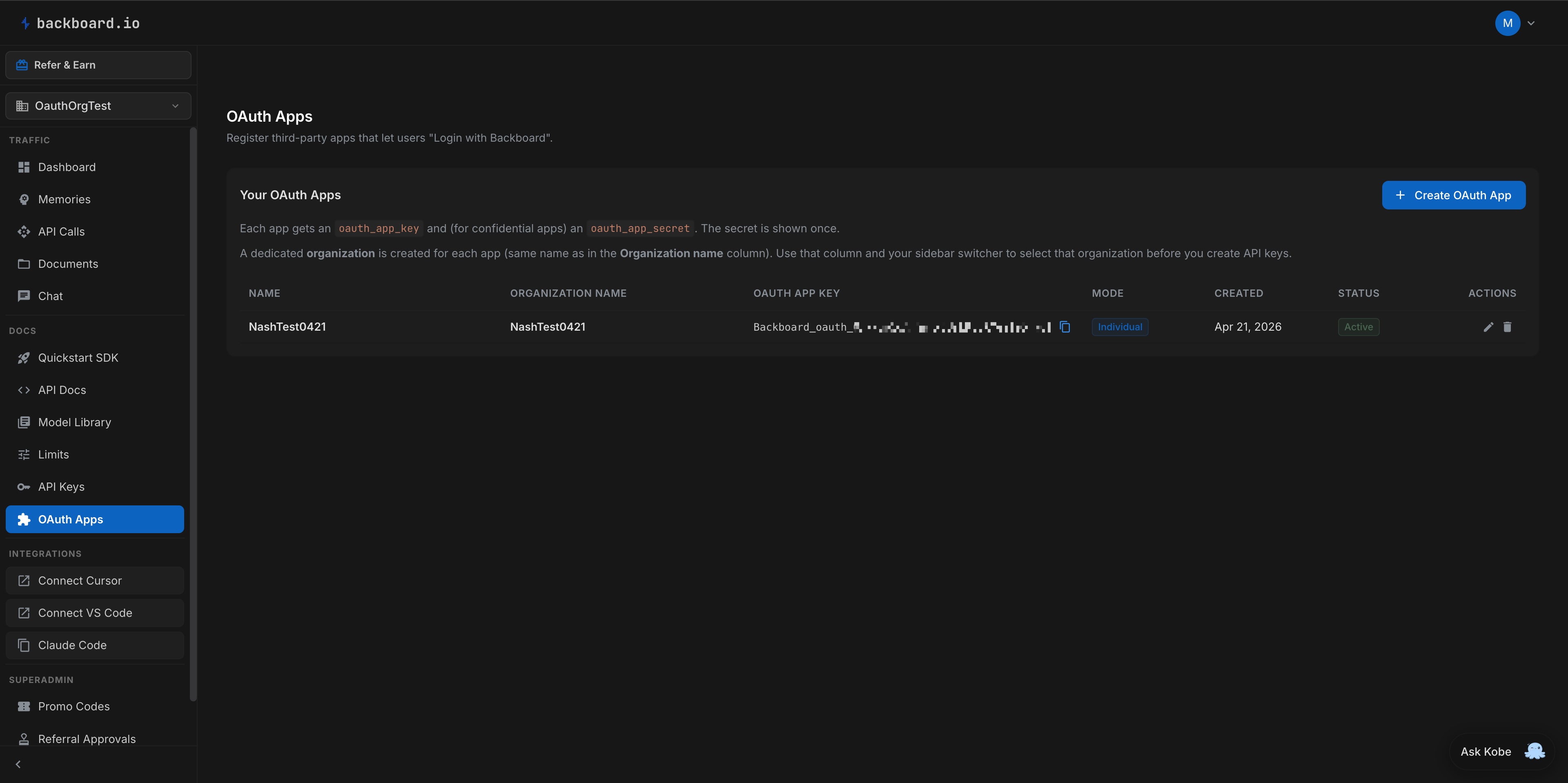
2. Save Your Credentials
After creating the app, you will see two values:
- OAuth App Key: your OAuth 2.0
client_id. Safe to embed in frontend code if needed. - OAuth App Secret: your
client_secret. Private; use only on your server or in a secret manager.
The OAuth App Secret is only shown once. Copy it immediately and store it in a secure place like an environment variable. If you lose it, you will need to rotate it from the dashboard (which invalidates the old one).
3. Create API_Key
If you choose individual mode for your app, you don’t need to do this.
If you choose organization mode, please follow the instruction below:
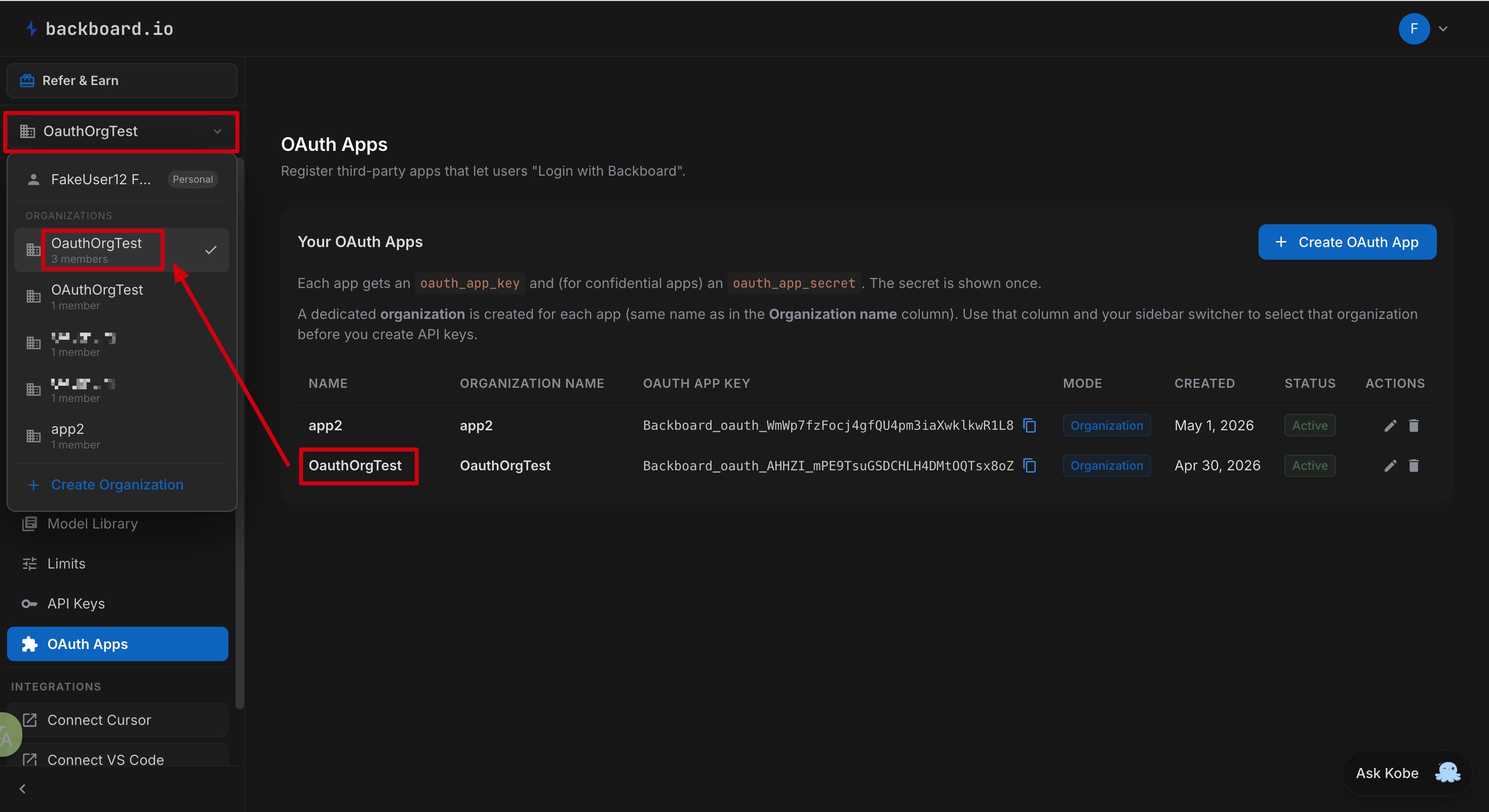
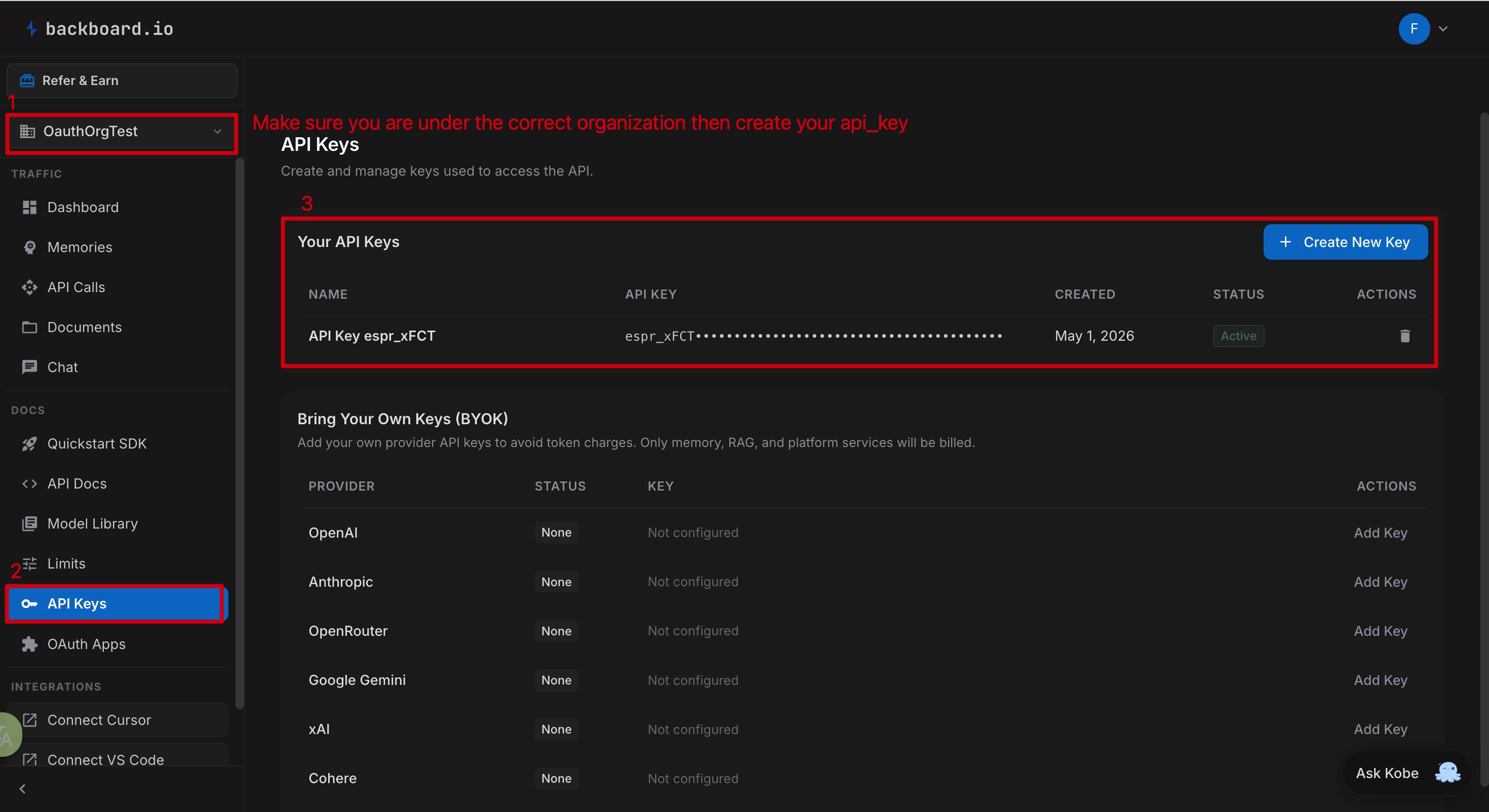
Go to the Backboard Dashboard and click the organization button (red box in the picture below) from the sidebar. Choose the organization with same name as your OAuth app, then create your api_key.
Building the Login Flow
Step 1: Redirect the User to Backboard
When the user clicks your “Log in with Backboard” button, you call the authorization endpoint GET /api/oauth/authorize with query parameters as in this example:
from urllib.parse import urlencode

params = {
    "client_id": "YOUR_OAuth_App_Key",
    "redirect_uri": "http://localhost:3000/auth/callback",
    "response_type": "code",
    "scope": "openid email profile",
    "state": "RANDOM_STRING",
    "code_challenge": "GENERATED_CHALLENGE",
    "code_challenge_method": "S256",
    "nonce": "OPTIONAL_RANDOM_STRING",
}
authorize_url = f"https://app.backboard.io/api/oauth/authorize?{urlencode(params)}"
# Redirect the user's browser to authorize_url (302 from your server or window.location)
It is a browser entry point. This means you are not posting JSON to a “REST” endpoint. You send the user’s browser to this URL so they leave your site briefly. The query string tells Backboard which OAuth app this is (client_id), where to send the user afterward (redirect_uri), what data you want access to (scope), CSRF protection (state), and optionally PKCE (code_challenge / code_challenge_method). Backboard then shows consent in the browser, your server does not receive tokens from this GET request.
GET /api/oauth/authorize
Request parameters:
| Parameter | Required | Description |
|---|---|---|
client_id | Yes | Your OAuth App Key |
redirect_uri | Yes | Where the user is sent after login. Must exactly match a URI you registered. Include localhost when testing locally. |
response_type | No | Must be code (default in code is code). |
scope | No | Space-separated scopes (default openid). Must be a subset of the app’s registered scopes. |
state | Recommended | Opaque value you generate; echoed back on success and error redirects so you can detect CSRF. |
nonce | No | OIDC nonce; use with openid when you need to bind the id_token to this login (stored on the auth code). |
code_challenge | With PKCE | PKCE challenge; use with code_challenge_method. See PKCE (Extra Security) and RFC 7636. |
code_challenge_method | With PKCE | Use S256 with code_challenge. |
Response
Success — HTTP 302
| Destination | When |
|---|---|
{FRONTEND}/oauth/consent?... | Consent app loads; user signs in or continues, then approves so your app receives code on redirect_uri |
Error — HTTP 302 to your redirect_uri with error, error_description, and state (OAuth-style redirect errors).
Error — HTTP 400 JSON body (no redirect), for example invalid or unknown client / malformed request in cases where redirect is not used:
import json

body = {"error": "invalid_client", "error_description": "..."}
print(json.dumps(body, indent=2))
Why there’s often no JSON: The authorization endpoint is defined around redirects (OAuth 2 / browser flows). A successful step returns 302 — meaning “open this next URL” (Backboard’s consent page). There is no { "success": true } body because the protocol expects the browser to follow Location, not your backend to parse JSON. The code appears later on your redirect_uri, only after the user approves (Step 2). 400 returns JSON when the request is invalid in a way that can’t be expressed as a redirect; some errors instead 302 back to your redirect_uri with error in the query string so the user returns to your app with an error state.
Step 2: Handle the Callback
After the user approves, Backboard redirects them to your redirect_uri with a code and state:
from urllib.parse import urlparse, parse_qs

# Example full URL the user's browser requests on your app
callback_url = "http://localhost:3000/auth/callback?code=Backboard_code_xxxxx&state=RANDOM_STRING"
query = parse_qs(urlparse(callback_url).query)
code = query["code"][0]
state = query["state"][0]
In your callback handler:
- Check that the
statein the URL is the same random string you generated in Step 1. If it does not match, reject the request (this prevents attackers from forging login attempts) - Take the
codefrom the URL and exchange it for tokens by calling Backboard’s token endpoint (see Step 3 below)
Step 3: Exchange the Code for Tokens
Call this from your server only, never from the browser. Use POST /api/oauth/token with form data. Authenticate the OAuth app with client_id plus either client_secret (confidential) or code_verifier (public). See PKCE (Extra Security) for how code_verifier fits the full flow.
POST /api/oauth/token
Content-Type: application/x-www-form-urlencoded.
Client authentication: Send client_id. Also send client_secret (apps with a secret) or code_verifier (public apps, no secret).
PKCE: If /authorize used code_challenge, add code_verifier when you exchange the code. Do this even when you also send client_secret.
Authorization code (grant_type=authorization_code)
Request parameters
| Form field | Required | Description |
|---|---|---|
grant_type | Yes | authorization_code |
code | Yes | Authorization code from the redirect |
redirect_uri | Yes | Same value as in the authorize request |
client_id | Yes | OAuth App Key |
client_secret | One of two | Confidential clients |
code_verifier | One of two, or both with PKCE | Public clients: use instead of client_secret. Also required if /authorize sent code_challenge, even alongside client_secret |
Response
Success — HTTP 200
| Field | Type | Description |
|---|---|---|
access_token | string | Bearer access token |
token_type | string | Bearer |
expires_in | number | Access token lifetime in seconds |
refresh_token | string | Refresh token |
scope | string | Granted scopes |
id_token | string | null | RS256 JWT when openid was granted; otherwise null |
assistant_id | string | null | See App mode below |
backboard_api_key | string | null | See App mode below |
selected_client_name | string | null | The organization the user signed in under, or null for their personal account |
App mode (sso_mode)
| Mode | assistant_id | backboard_api_key |
|---|---|---|
| INDIVIDUAL | Personal assistant id when provisioning succeeds | Personal API key when the server can return one (may be null if the account cannot receive a key) |
| ORGANIZATION | Assistant id for the user in that app’s org | Always null (org billing and API access, not a personal key here) |
Context selection
When a user belongs to one or more organizations, the consent step records which context they chose:
| Value | Meaning |
|---|---|
null | The user’s personal account |
| An organization name | That organization, matched among the user’s active memberships |
A personal account is selected by passing null, never by name. Passing a personal client’s company name is rejected with invalid_request / "Invalid context selection".
Organization names are not globally unique, so a name is only ever matched against organizations the user is actually an active member of.
Error — HTTP 400 / 401
Invalid or expired code, PKCE mismatch, redirect_uri mismatch, unknown client, bad client_secret, missing code_verifier when PKCE requires it, and similar.
To rotate access tokens without another login, use grant_type=refresh_token on the same endpoint. See Step 5: Refresh the Token.
Examples
import requests

response = requests.post(
    "https://app.backboard.io/api/oauth/token",
    data={
        "grant_type": "authorization_code",
        "code": "Backboard_code_xxxxx",
        "redirect_uri": "http://localhost:3000/auth/callback",
        "client_id": "YOUR_CLIENT_ID",
        "client_secret": "YOUR_CLIENT_SECRET",
    }
)

tokens = response.json()
access_token = tokens["access_token"]
refresh_token = tokens["refresh_token"]
Sample JSON (authorization code grant)
import json

sample = {
    "access_token": "Backboard_at_xxxxx",
    "token_type": "Bearer",
    "expires_in": 3600,
    "refresh_token": "Backboard_rt_xxxxx",
    "scope": "openid email profile",
    "id_token": "eyJhbGciOi...",
    "assistant_id": "abc123-def456",
    "backboard_api_key": "espr_xxxxx",
}
print(json.dumps(sample, indent=2))
Step 4: Get User Info (optional)
You do not have to call this endpoint. If openid was granted, the id_token from Step 3 already contains sub and often other claims. You can also use fields returned on the token response (for example assistant_id) without calling userinfo. Use GET /api/oauth/userinfo when you want a standard profile document from the access token, or you do not want to parse the JWT.
GET /api/oauth/userinfo
| Input | Details |
|---|---|
Header Authorization | Required. Bearer <access_token> |
Success — HTTP 200 — JSON. Claims depend on token scopes:
| Scope | Claims |
|---|---|
openid | sub (required on success) |
email | email, email_verified |
profile | name, given_name, family_name, assistant_id (assistant resolved per app mode) |
Fields absent for unrequested scopes are omitted or null.
Errors
| Status | Example body |
|---|---|
401 | { "detail": "Bearer access token required" } or { "detail": "Invalid or expired access token" } |
403 | { "detail": "Token is missing the 'openid' scope required for /userinfo" } |
Examples
user = requests.get(
    "https://app.backboard.io/api/oauth/userinfo",
    headers={"Authorization": f"Bearer {access_token}"}
).json()

print(user["email"])         # "alice@example.com"
print(user["name"])          # "Alice Smith"
print(user["sub"])           # stable Backboard account ID for this user
print(user["assistant_id"])  # Backboard assistant ID
Step 5: Refresh the Token
Access tokens expire (default: 1 hour). Call POST /api/oauth/token again with grant_type=refresh_token. Same Content-Type: application/x-www-form-urlencoded and the same client authentication rules as Step 3 (client_id plus client_secret or code_verifier).
Refresh token (grant_type=refresh_token)
Request parameters
| Form field | Required | Description |
|---|---|---|
grant_type | Yes | refresh_token |
refresh_token | Yes | Current refresh token |
client_id | Yes | OAuth App Key |
client_secret | One of | Confidential clients |
code_verifier | One of | Public clients (authenticate without a secret) |
Response
Success — HTTP 200
| Field | Type | Description |
|---|---|---|
access_token | string | New bearer access token |
token_type | string | Bearer |
expires_in | number | Access token lifetime in seconds |
refresh_token | string | New refresh token (rotation; replace your stored token) |
scope | string | Granted scopes |
Do not rely on id_token, assistant_id, or backboard_api_key on refresh; they are not set by this grant (they may be absent or null in JSON).
Error — HTTP 400 / 401
Invalid or already-used refresh token, client auth failure, expired refresh token, unsupported grant_type, etc.
Only authorization_code exchanges return id_token, assistant_id, and backboard_api_key with meaningful values when applicable. refresh_token responses carry the five core token fields in the table above.
Examples
response = requests.post(
    "https://app.backboard.io/api/oauth/token",
    data={
        "grant_type": "refresh_token",
        "refresh_token": "Backboard_rt_xxxxx",
        "client_id": "YOUR_CLIENT_ID",
        "client_secret": "YOUR_CLIENT_SECRET",
    }
)

new_tokens = response.json()
new_access_token = new_tokens["access_token"]
new_refresh_token = new_tokens["refresh_token"]
Sample JSON (refresh)
import json

sample = {
    "access_token": "Backboard_at_xxxxx",
    "token_type": "Bearer",
    "expires_in": 3600,
    "refresh_token": "Backboard_rt_newxxxxx",
    "scope": "openid email profile",
}
print(json.dumps(sample, indent=2))
Use client_secret or code_verifier on this call, same rules as Step 3.
Each refresh token can only be used once. When you refresh, you get a new refresh token back. Always save the new one and discard the old one.
Quick reference
| Endpoint | Method | Purpose |
|---|---|---|
/api/oauth/authorize | GET | Start login (redirect / consent UI) |
/api/oauth/token | POST | Code exchange or refresh |
/api/oauth/userinfo | GET | OIDC userinfo |
/api/oauth/revoke | POST | Revoke a token |
PKCE (Extra Security)
PKCE (Proof Key for Code Exchange) is an extra layer of security that prevents attackers from stealing authorization codes. It is required for public clients (like mobile apps or single page apps) and recommended for all apps.
How it works:
- Before redirecting the user, generate a random
code_verifier(a long random string) - Hash it to create a
code_challengeusing SHA256 - Send the
code_challengein the authorize URL - Send the
code_verifierwhen exchanging the code for tokens
import hashlib
import base64
import secrets

# Generate verifier and challenge
code_verifier = secrets.token_urlsafe(32)
code_challenge = base64.urlsafe_b64encode(
    hashlib.sha256(code_verifier.encode()).digest()
).rstrip(b"=").decode()

# Use code_challenge in the authorize URL
# Use code_verifier in the token exchange (instead of client_secret)
When using PKCE, send code_verifier instead of client_secret in the token exchange:
import requests

response = requests.post(
    "https://app.backboard.io/api/oauth/token",
    data={
        "grant_type": "authorization_code",
        "code": "Backboard_code_xxxxx",
        "redirect_uri": "http://localhost:3000/auth/callback",
        "client_id": "YOUR_CLIENT_ID",
        "code_verifier": "YOUR_CODE_VERIFIER",
    },
)
tokens = response.json()
Revoking Tokens
If a user wants to disconnect your app, or you need to invalidate a token for security reasons:
POST /api/oauth/revoke
RFC 7009-style revocation. client_id and client_secret are both required` (revocation cannot be done with PKCE-only).
| Form field | Required | Description |
|---|---|---|
token | Yes | Access or refresh token string to revoke |
client_id | Yes | OAuth App Key |
client_secret | Yes | App secret |
token_type_hint | No | Accepted for compatibility; not required |
Success 200 — empty JSON object:
import requests

response = requests.post(
    "https://app.backboard.io/api/oauth/revoke",
    data={
        "token": "Backboard_at_xxxxx",
        "client_id": "YOUR_CLIENT_ID",
        "client_secret": "YOUR_CLIENT_SECRET",
    },
)
assert response.json() == {}
Errors 401 — missing credentials or invalid client_id / client_secret.
This works for both access tokens and refresh tokens.